Friday, July 13, 2007

Friday -- And the 13th!

Good morning!

Today is Friday, but it's something more.

It is also the 13th. Do you feel that this day is any different than a Friday with any other number?

I don't. It's Friday, therefore, it is a good day! And still my favorite day of the week!

Have a great Friday the 13th! I will!

See you tomorrow!

Thursday, July 12, 2007

Quick Fun for Thursday


Good morning!

This is just a little quick fun thing I did for Thursday.

Hoping this is a FAST Thursday.

I'll be back tomorrow.

Kalei Art - a Nice Setting #1 B

Good morning,

This post is for yesterday: Wednesday.

It is taking the same settings we used on Tuesday, and showing how it turned out.

I think you get the idea.

I hope you had a great Wednesday!

Back in a moment.

Tuesday, July 10, 2007

Kalei Art - a Nice Setting #1


Good morning!

It is NOT a secret that I love kalei art. I've been fascinated about it since I found psp.

Today, I am sharing how I achieve patterns I like.

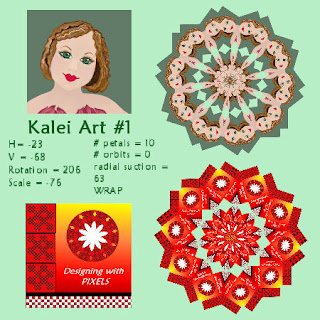
Here are two creations I made that I've displayed over the last few days. I applied the same setting to each creation.

When I find a setting I like, I write it down.

I kalei almost anything I've created. After my creation is finished, I copy it onto a new canvas. I make my selection smaller by using my raster deform tool. I take it down to the size you see each creation here.

Then I choose my selection tool, choose circle or eclipse (or any shape you prefer), and enclose my mini creation. I then go to Effects > Reflection Effects > Kaleidoscope and type in the numbers I want. In this case, horizontal is -23, vertical is -68, rotation is 206, scale is -76 (more about the scale in a minute), # of petals is 10, # of orbits is 0, and radial suction is 63. I then choose wrap.

I used this setting on both creations. You can see that the pattern is similar in each.

The scale is a nice feature. Try experimenting with just it. The little bar on the bottom will move your view closer or further out. To the right is closer, to the left is out.

As long as your creation is enclosed in a selection shape, the result will be very pleasingly kept in a new shape and creation. Without the selection, it will consume your canvas.

I also like to layer kalei's. I do this by starting with the original creation, reducing it down, choosing a selection, and hit merge down to get rid of the bottom transparency (which you have, if you copied and pasted your selection on the new canvas). While it is selected, I duplicate it. Each duplication will have the selection still set on the new layer.

Make sure the layer you are working on is active, and "x" out any layers you don't want to see while making your kalei. In this way, you can create a new kalei on different layers using the same original small creation. Try playing with each number on your horizonal, vertical, etc. options. You can move the scale closer or out for some pleasing results.

Another fun thing to do is to hit the dice button. The dice button gives you a new random creation each time you click it. It's amazing. When you find a setting you like, write it down. You can use this again and again.

I keep a book of kalei selections I've found that I like.

Sometimes when you hit the dice, the screen will be blank. Try scaling in or out. Or just hit the dice again. Sometimes you will get a color mixed in. Try playing with the options below: wrap, repeat, color, or reflect.

Sometimes when color comes up, you see just the color, but other times, it's mixed in with a new creation. In the beginning, I'd think, "Well, I like this design, but I hate the color mixed in." No problem! Just hit wrap, and the new color disappears, leaving just the design. Try hitting repeat and reflect as well. It may change a little, or it may not.

Kaleidoscoping is about experimenting.

When kaleidoscoping, you will see your original creation in the left hand box and the new creation in the right hand box.

If you've never played like this before in the kalei box, you don't know how mesmerizing it can become. I bet you will find a new fascination with this tool once you try these steps I've explained.

PSP has a world of tools within it. Try doing the same lesson using other tools. It all suddenly become truly amazing!

After you have layers of different creations, try viewing layers together by unclicking the "x" on a layer. Try different combinations. You will find some truly beautiful combos.

Using a creation to kalei will give you many accessories to use with your original creation as they usually will be in the same colors and shades you've used for its creation.

Have fun with it. Let me know what you think.

Have a great day. Tomorrow, we will use the same settings on two other creations. Just for fun.

Bye for today!

Monday, July 9, 2007

Prom Teen

Good morning,

The new week is here.

I must have been really tired this weekend as I slept a lot yesterday. And then, I slept 7 more hours last night.

This creation to the left was done in psp and with my Wacom Graphire pen. I am really liking this new pen.

It was awkward-feeling at first, but it gets easier each time I use it. I used it a lot on the hair and on her eyelashes. Eyelashes are still tricky. When working on them, I try pulling dark color from the eyeline above or below, and then pulling flesh color from the face back into it. Back and forth trying to get them feathier, and more life-like. I still need to work on them, but I finally accepted these.

I really like her hair. Her skin could've used a little more shading, but over-all, I like her appearance.

She looks a lot like a girl my middle son dated many years ago.

My reference was a picture of an older woman on a cover of a magazine I had. But, somehow, as I draw, the people take a younger look.

I hope you all have a wonderful day. My vacation has come to an end, and it's back to the salt mines today.

See everyone tomorrow!

Sunday, July 8, 2007

Blob Appeal

Hello again on this beautiful Sunday.

I realized I haven't done anything in Cosmic Blobs recently, so I decided to share how well Cosmic Blobs and psp go together.

This first blob to the far left was made in Cosmic Blobs. I copied him into PSP, eliminated the background, and then began playing with him.

The second picture shows changing his hair, and kind of softening some of his coloring and changing his face shape slightly. The third shows a much changed man. He could even be the son of the original or second blob.

Playing in these two programs is great fun.

Have a great Sunday -- and I'll be back tomorrow.

Pixel Designs

Good morning,

The final day of the weekend is upon us. It will go fast.

This is a pixel creation. Very colorful.

I started by making just the little square in the upper left-hand corner. You see 3 tiles. The pixel portion is just the first little 25 blocks. Each little block is: red = 5 pixels across and down, and then black = 5 pixels across and down.

The first tile was created by placing one red and black pixel creation across the top 2 times. The second row placed the pixels between the two on the first row, and overlapping the bottom and tops of the left hand corner of each pixel. As I built it, I zoomed in to place it, and then reduced back in to see how it looked. I did this with each row until my tile was created, and then put a black frame around the tile.

Then I produced 3 tiles and lined them up. I added the black bar at the bottom to separate. I had also built a tiny red and white pixel box which I copied and pasted together across the bottom.

The flower is a kaleidoscope of a red and black pixel tile. (Later this week, I will share a setting I like in kaleis, and the effect you can get from different creations I've placed on this blog. See Tuesday and Wednesday.)

Pixel art is very time consuming. It's fun to play with, but doing pixels on a regular basis would be too involved.

If you're interested in pixels, do a search in your favorite engine for pixel designs. I was very surprised by the amount of info on it. It appears that it can be a great background for webpages, but I'm not sure I would want to do that much work on just a pixel design.

Certain fonts can also be used for pixel creations. It's amazing.

Pixels can be used to create small drawings or creatures. They can also be animated.


Here is an example of pixel graphics. As you can see, it is difficult to get a crisp-looking little mouse. Graph paper would be a help or just using the graph provided in psp would be a help in designing your outline.

Getting the outline just perfect is something I find difficult. But there are many great pixel artists out there in the internet world.

Have a great Sunday.

My granddaughter is here tonight, and should be up soon. Her mom will pick her up for church early.

See you back here -- tomorrow!